
Creating an Account in SignUpJester
Getting started with SignUpJester is quick, easy, and completely free. You can create your account in just a few steps and begin setting up events right away.
👣 Step‑by‑Step Guide
Step 1: Get Started
- Go to signupjester.com.
- Click Get Started to begin creating your account.

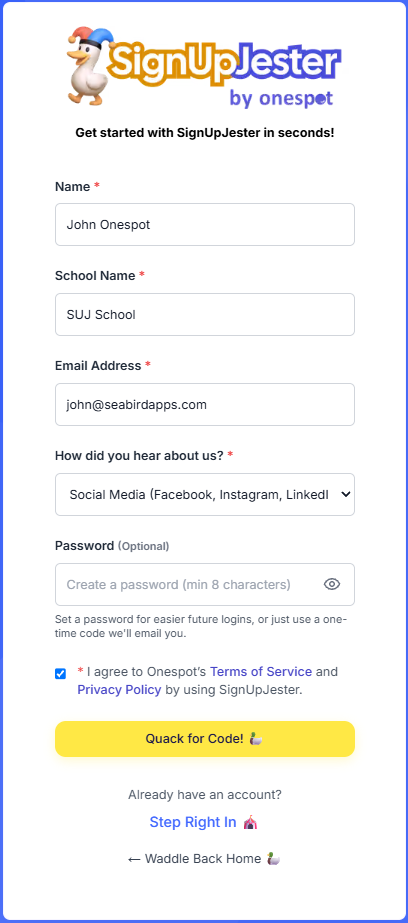
Step 2: Fill out the sign-up form
- Enter your Name, School Name, and Email Address.
- Create a Password (optional).
🦆Note: You can skip the password. Instead, you’ll receive a Magic Code sent to your email each time you log in.
- Choose how you heard about SignUpJester. If you select Other, type your answer in the box that appears.
- Tick the box to agree to the Terms of Service and Privacy Policy.
- Click Quack for Code!
Step 3: Check Your Email for the Code
- Open your inbox and copy the Magic Code.
- Return to SignUpJester and enter the code.
- Once verified, you’ll be redirected to your dashboard, where you can start creating events.