
Creating a School-Wide Group Chat or Activity Feed
A school-wide activity feed allows administrators to post updates, announcements, and discussions that notify all users within the school community. By enabling comments, it fosters engagement between parents, staff, and students, keeping everyone informed in a single, organized space.
Step-by-Step Guide to Setting Up a School-Wide Activity Feed
Step 1: Create a New Activity Feed Screen
- Click the Lightning Bolt Icon ⚡and select New Screen.
- Choose Activity Feed as the screen type.
- Name the feed (e.g., School Updates or All-School Chat).
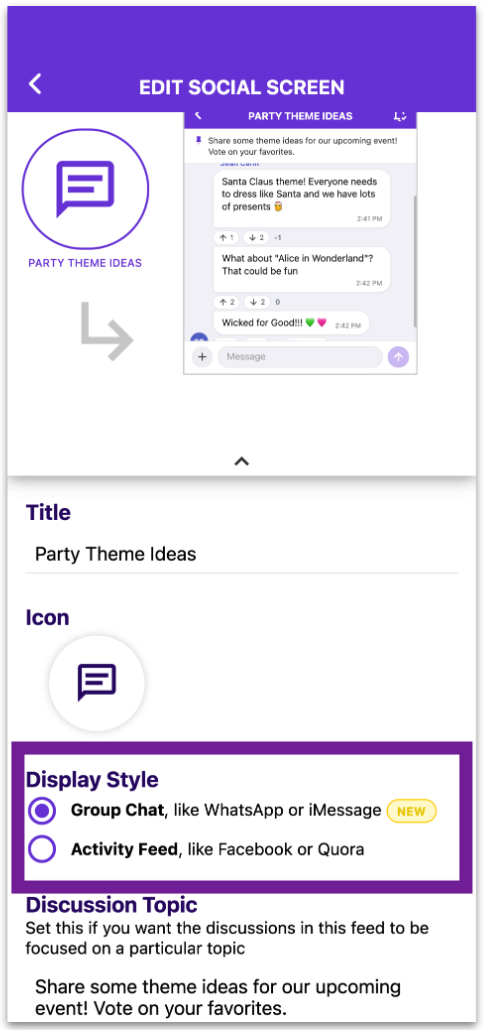
💡 Choosing a look: The screen type you pick sets how it looks at first. Activity Feed shows posts you scroll through, like Facebook. Group Chat shows message bubbles, like WhatsApp or iMessage, and starts with access set to members only. After the screen is created, you can change the look anytime under Display Style in its settings. Nothing is lost when you switch.
What changed:
Step 2: Set Visibility and Permissions
- Choose whether:
- All users have access to the feed.
- Only subscribed users can view and engage.
- Set posting permissions:
- Allow parents and staff to post updates.
- Enable everyone to comment and engage.
Step 3: Subscribe All Users
- Open the newly created School Updates feed.
- Click Add Members and choose Subscribe All Members.
- This ensures that everyone is automatically notified when a new post is added.
Step 4: Post and Notify Users
- Admins or authorized users can post updates in the feed.
- Each post triggers notifications to all subscribed members.
- Users can comment, engage, and discuss updates in real-time.
Optional: Add Attachments or a Poll to a Post
When creating a post, admins and members can also:
- Add multiple images
- Attach PDF files
- Attach a poll to ask a question with up to 12 options and see the results live.
See How to Create and Use Polls in Group Chats and Activity Feeds.
Why Use This Feature?
An all-school activity feed centralizes communication, ensuring that important updates reach everyone instantly. Instead of relying on multiple emails or announcements, this feature allows schools to engage their entire community in one unified space. By enabling comments and discussions, it fosters collaboration, quick responses, and stronger connections within the school. 🚀